NZB Fast Review and Benchmark vs SABnzbd and NZBGet
Last Updated: November 11, 2026
NZB Fast is a new Usenet downloader that makes one bold claim: it unpacks archives while it is still downloading them, so you wait less and need less disk space. We put that claim to the test on a home NAS against SABnzbd and NZBGet, the two downloaders most people use today.
What NZB Fast does
If you already use Usenet, you know the routine. An NZB file tells your downloader which articles to fetch. The downloader gets them, repairs any damage with PAR2 files, and unpacks the RAR (or 7z, or zip) archives into the finished files.
SABnzbd and NZBGet also support early extraction through Direct Unpack. Downloading and extracting can overlap, but keeping archive parts alongside the finished files can still have two costs:
- You need about twice the release size in free space, because the archive parts and the unpacked files exist at the same time.
- Repair or remaining extraction can extend completion beyond the download itself.
NZB Fast extracts each archive volume as it arrives. The project calls this one-pass downloading. In theory, the job finishes when the download finishes, and you need about 1x the release size in free space.
It also bundles extras that the older tools leave to other programs: a built-in indexer search, a watchlist, a media browser, and a preview. It pretends to be SABnzbd or NZBGet in its API, so Sonarr and Radarr can use it as a download client. It can import your servers from an existing SABnzbd configuration.
Note
NZB Fast is free software under the GPL-3.0-or-later license. The repository does not name its developer. Its README says the project is built with heavy AI assistance, and that the maintainer reviews what ships.
How we tested
We wanted a test anyone could repeat, with content that is clearly legal.
- The release: We downloaded the official Debian 13.7.0 DVD-1 ISO (3.99 GB), checked its SHA-512, split it into 100 MB RAR volumes and added a PAR2 repair set with 10% recovery. We then posted it to
alt.binaries.testourselves. Checking all 6,162 articles on the download server found every one present. - The hardware: A Ugreen NAS with 4 CPU cores and 7.5 GB of RAM, running Docker. Each downloader ran in its own container, one at a time, with its own empty download folder.
- The server: The same single Newshosting US server and 20 connections for every app. Our other containers were still running, so the NAS was not idle.
- The runs: Three runs per setup, rotating the order each round. The clock ran from submitting the NZB until the app itself reported the job complete. After every run we checked the unpacked ISO against Debian’s published checksum.
- The settings: Defaults for all apps, plus Direct Unpack turned on for SABnzbd and NZBGet. Direct Unpack is those programs’ own way of unpacking early.
The main tests ran on November 10, 2026, Pacific time (beginning November 11 at 03:33 UTC). These are our NAS measurements, not the developer’s published benchmark results.
Tested builds: NZB Fast 1.10.0, SABnzbd 5.1.3 and NZBGet 26.3. We recovered these from the retained benchmark containers: NZB Fast’s immutable image is labelled 1.10.0; SABnzbd and NZBGet’s historical startup logs identify their versions. All three containers were created before the main runs. The original result files did not record versions, so we checked the retained containers rather than assuming that today’s latest tag was the tested build. NZB Fast’s v1.10.0 release is dated November 10.
Results
Speed
The chart shows the median of three runs as a bar, and each run as a dot, so you can see how much the results moved around.
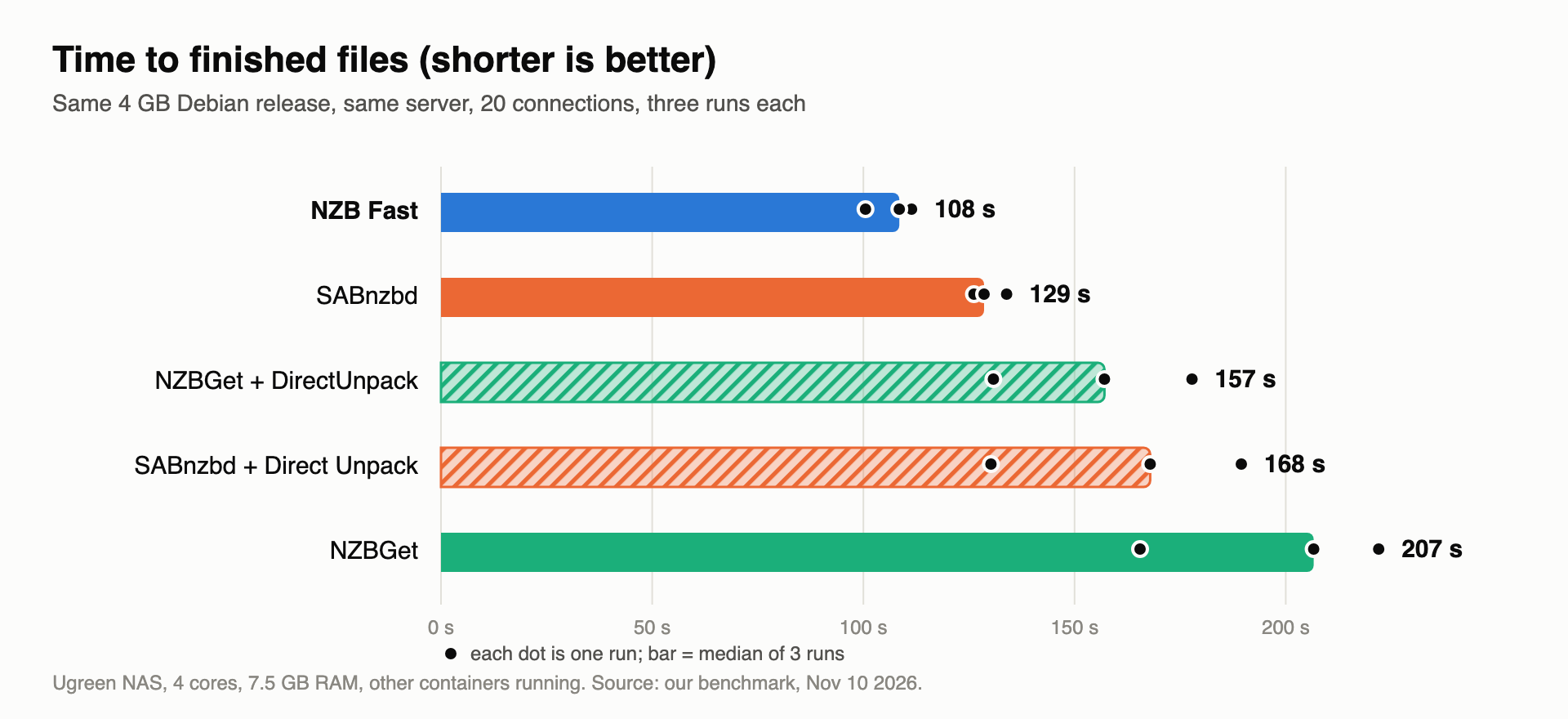
The same numbers as a table, with peak disk use. Peak disk is the most space any run used, counting allocated blocks.
| Downloader | Median time | Speed to finished files | Peak disk |
|---|---|---|---|
| NZB Fast | 108.5 s | 36.8 MB/s | 3.7 GiB |
| SABnzbd | 128.6 s | 31.0 MB/s | 7.4 GiB |
| NZBGet with DirectUnpack | 157.1 s | 25.4 MB/s | 7.4 GiB |
| SABnzbd with Direct Unpack | 167.9 s | 23.8 MB/s | 7.4 GiB |
| NZBGet | 206.6 s | 19.3 MB/s | 7.4 GiB |
All 15 main-test runs completed successfully and produced an ISO matching the SHA-512 checksum. “Speed to finished files” is payload size divided by total completion time, not a separate measurement of network throughput.
What stands out:
- NZB Fast was fastest in every round. It was about 16% quicker than SABnzbd and nearly twice as fast as default NZBGet. Its three runs ranged from 100 to 111 seconds.
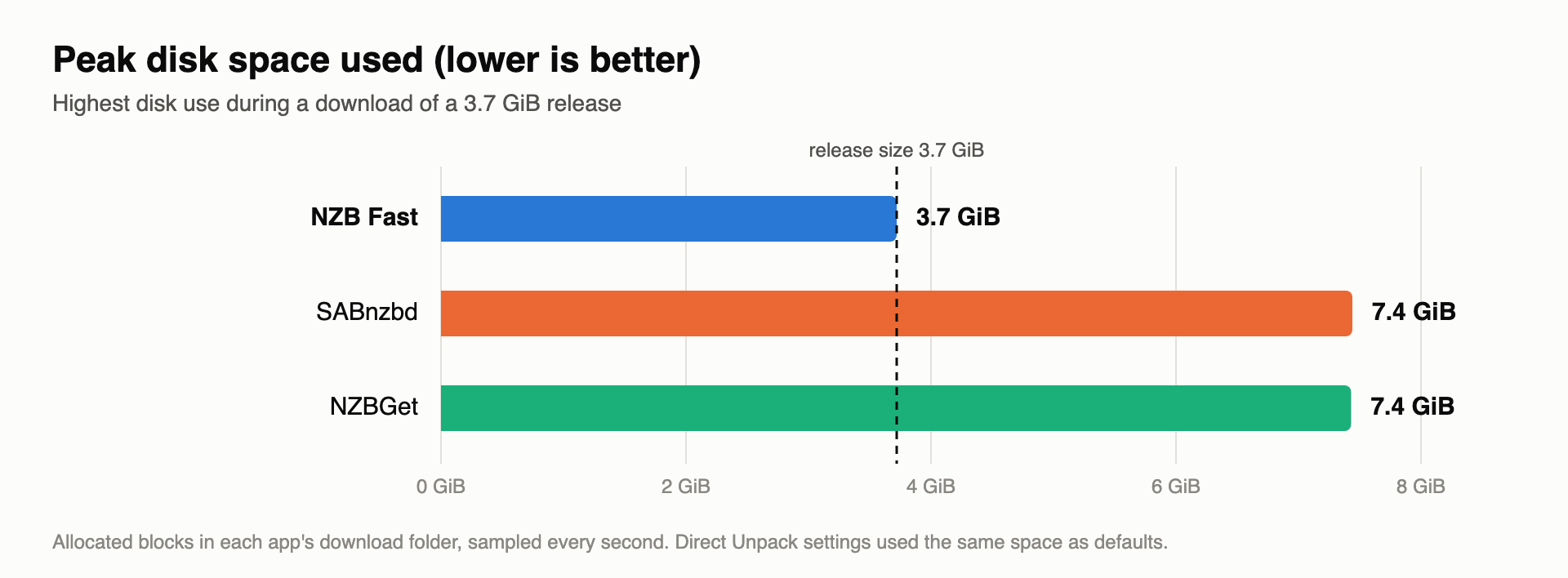
- The disk claim held up. NZB Fast peaked at about 3.7 GiB for a 3.7 GiB release. Every other setup peaked near 7.4 GiB.
- Direct Unpack was not a free win. It helped NZBGet in this batch, while SABnzbd took longer. Three runs are not enough to conclude that Direct Unpack generally makes SABnzbd slower.
- The times were noisy. SABnzbd with Direct Unpack ranged from 130 to 190 seconds across three runs. Treat differences of 10-20% between close competitors with care.
Disk space
This is where NZB Fast’s design shows. In this workload, SABnzbd and NZBGet peaked near twice the release size, including the Direct Unpack setups. These figures measure allocated space in the download folders, not total container or system storage.
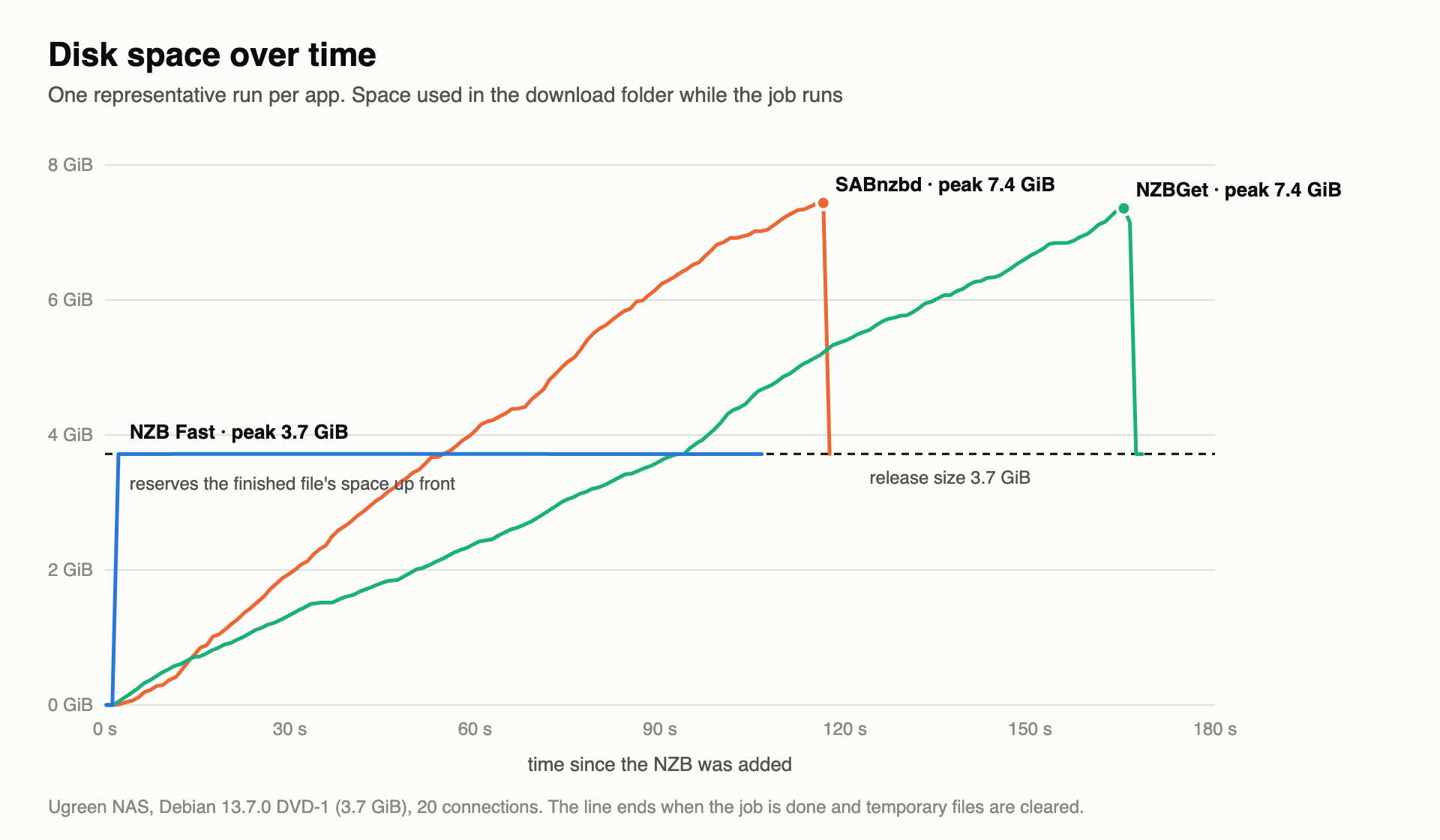
Plotting disk use over time shows why. The older downloaders climb steadily to about 7.4 GiB and then drop back to 3.7 GiB once they delete the archives. NZB Fast reserves the space for the finished file within the first couple of seconds and stayed close to that allocation during this clean-release test.
Note
Reserving the space up front means NZB Fast needs the full 3.7 GiB free when the job starts, not gradually. That is still half of what the others need at their peak. The chart shows one representative run per app.
Two more tests
The first results were from a clean release with 20 connections. We also tested a damaged release and 40 connections, with two runs per app in each additional scenario. These were separate batches; NAS background load varied, so compare clients within each scenario rather than treating a cross-batch change as proof of a setting’s benefit.
A damaged release
Usenet articles go missing. We removed 92 articles (1.5% of the RAR data) from the NZB, so each app had to repair the files from the PAR2 set before unpacking. We ran each app twice.
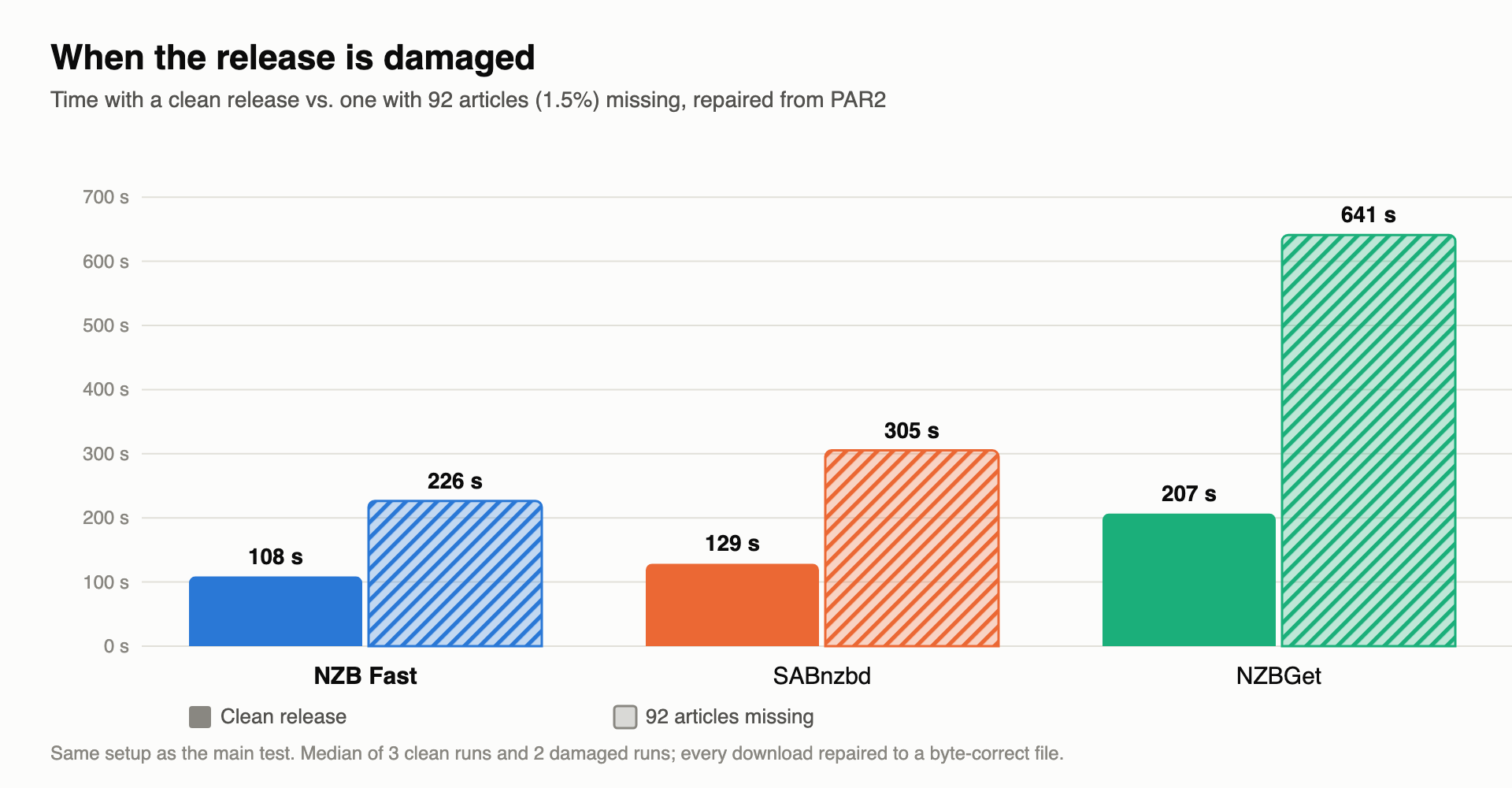
Every app repaired the release to a byte-correct ISO, but repair took very different amounts of time. NZB Fast took 226 seconds, about a quarter less than SABnzbd (305 seconds). NZBGet took 641 seconds, nearly three times as long as NZB Fast. NZB Fast’s peak disk use rose only slightly, to 4.0 GiB.
More connections
Our default of 20 connections is below what Newshosting allows. NZB Fast’s own tuner reported that more would help, so we ran every app again at 40.
| Downloader | Additional 20-connection batch | 40-connection batch |
|---|---|---|
| NZB Fast | 107.1 s | 98.1 s |
| SABnzbd | 119.0 s | 130.5 s |
| NZBGet | 177.5 s | 149.6 s |
These are medians of two runs per app. NZB Fast and NZBGet finished sooner in the 40-connection batch; SABnzbd did not. Because the batches ran at different times on a busy NAS, this does not establish that connection count alone caused the differences. Test settings on your own connection rather than assuming that more connections always help.
Note
We left RAM and CPU out of the results on purpose. Our sampling was too coarse to trust, and NZBGet reported implausibly low memory in some runs. The damaged-release and 40-connection tests had only two runs per app. One ISO, one server and one NAS cannot establish performance across providers, archive formats or hardware.
Is it worth using?
For a download box with limited disk space, it may well be. A 2x space requirement is a real problem on a small SSD or a nearly full NAS, and NZB Fast avoided that extra allocation in our clean-release test.
If SABnzbd already works for you, the speed gain on a clean download is modest. A 20-second saving on a 4 GB release will not change your day, and your connection and provider matter more than the client. The gap widened with damaged releases, where NZB Fast finished about a quarter faster than SABnzbd. That is promising, but our deliberately damaged test release does not represent every repair problem.
What to watch out for
Warning
NZB Fast has no login page. Access is controlled by an API key, and the dashboard listens on all network interfaces by default. Do not expose port 6789 to the internet without HTTPS and a reverse proxy. Provider passwords in its config file are obfuscated, not encrypted.
- Unsigned apps. The macOS and Windows builds are not notarized or code-signed, so expect security warnings on first launch. Docker avoids that.
- Unknown maintainer. We could not find out who runs the project. That matters for software that holds your provider login.
- Young software. SABnzbd and NZBGet have been maintained for many years. NZB Fast is much newer, with a smaller community.
- Duplicate protection. NZB Fast held a second copy of the same release as an “alternative” until we cleared its queue. NZBGet also skipped an NZB it considered a copy. That is sensible protection, but it can surprise you when you re-download on purpose.
- Not always one-pass. Self-extracting archives, spanned zips and resumed jobs fall back to the slower two-copy path.
How to try it
- Run it in Docker. The image is
nzbfast/nzbfast, and the dashboard is on port 6789. - Add your Usenet server in the dashboard, or use the SABnzbd import to bring your servers across. Keep your connection count in line with your provider’s limit.
- Drop in an NZB, or connect Sonarr and Radarr with the API key.
- Keep the dashboard on your home network only.
Editor’s Tip:
Test it next to your current downloader before switching. Run the same NZB through both and compare the time and disk use on your own hardware.
Our verdict
NZB Fast delivered on its main promises in our test: it was the fastest, and it needed half the disk space. The security basics and the unknown maintainer mean we would try it on a local network first, not rely on it yet. More releases, image digests recorded with every run and an otherwise idle NAS would make a stronger follow-up test.
For features, setup and security details, see the NZB Fast project. Want a proven setup now? Read our SABnzbd review.
Review updates
November 11, 2026: NAS benchmark results. November 10 tests showed faster completion and lower peak download-folder disk use for NZB Fast on this workload. The retained containers identify the tested builds; the small sample limits broader conclusions.