How to Setup Stunnel for USENET
Last Updated: Jul 16, 2019
By using Stunnel you can enable SSL connections to Usenet even if you do NOT have an SSL supported Usenet newsreader or USENET news poster. Reminder Stunnel is for Windows / Andriod / UNIX only.

Setup Stunnel for Usenet in 8 Steps
1) Go the stunnel download page — > https://www.stunnel.org/downloads.html and download the latest version.
2) Install stunnel with all default options
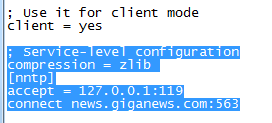
3) Edit the stunnel.conf file and look for the following lines; Use it for client mode ;client = yes and remove the ; in front of ;client = yes
4) Edit the config file so that it looks like this ..
; Service-level configuration
compression = zlib
nntp
accept = 127.0.0.1:119
connect news.giganews.com:563
5) Save the file and close the window
6) Go to Start->All Programs->Stunnel->Run Stunnel to start stunnel and then you should see the program running in your taskbar.
7) Go to Server Setup in your favorite news client and setup a new connection with the following settings: Server address 127.0.0.1 port 119 with 20 connections
8) Use your regular login and password and you are done! Your Usenet Connection is Now Secure.